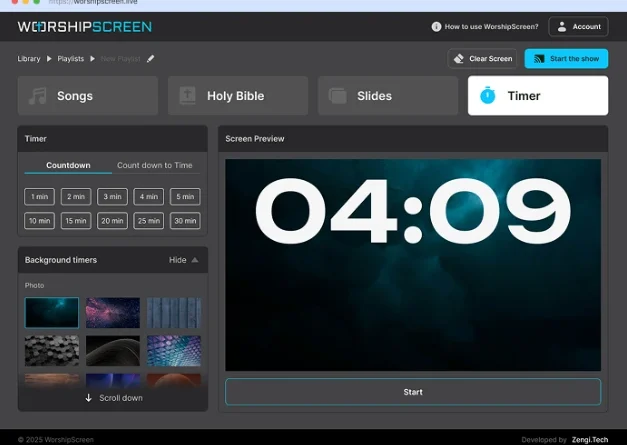
WorshipScreen Church Presentation Software: A Practical Guide for Worship Services
A well-organized visual presentation can make a church service easier to follow for everyone in the congregation. Worship lyrics help people participate in songs, Bible verses make Scripture immediately visible, and carefully prepared announcements, images, and videos help maintain a clear structure throughout the service.
At the same time, managing all these elements can become complicated when a church relies on several different applications. A song may be stored in one file, Bible passages in another, videos in a separate folder, and announcements in a different presentation. The person operating the screen then has to move between multiple tools during a live service.
WorshipScreen offers a simpler approach. It is a browser-based church presentation platform that brings worship songs, Bible verses, sermon materials, images, videos, backgrounds, and other service content together in one place. It can be used as a free solution for churches that want to organize visual presentations without purchasing complex professional presentation software.
What Is WorshipScreen?
WorshipScreen is designed specifically around the practical workflow of a church service. Its purpose is to help churches prepare visual content before a service and display that content in the correct sequence while the service is taking place.
The platform works through a web browser, so there is no need to build a complicated installation on every computer used by the church. After creating an account, users can prepare their content and organize it into playlists for individual services or events.
A playlist can contain songs, Bible passages, images, videos, announcements, and other presentation elements. This means the operator can have the majority of the service prepared before the first person enters the building.
The software can therefore be useful for both churches with a dedicated technical team and smaller congregations where presentations are managed by volunteers.
Why a Church Presentation System Is Important
A church service can move through many different stages in a short period of time. Worship may be followed by announcements, prayer, Scripture reading, preaching, a video, or another song.
Every transition creates a potential technical problem if the content is not prepared properly.
A dedicated presentation system gives the operator one central place from which to manage these materials. Instead of searching through folders while the service is happening, the operator can work through an organized playlist.
This is particularly valuable for volunteers who may not have extensive experience with professional audiovisual software. A straightforward workflow reduces the number of decisions that need to be made during the service.
Getting Started
The first step is to open WorshipScreen in a browser and create an account. Once the workspace is available, a church can start adding its regular presentation materials.
It is helpful to begin with the content that will be used repeatedly. Worship songs are a good example because many churches use the same collection of songs over a period of months or years.
After that, the church can prepare Bible passages, backgrounds, announcement graphics, videos, and other frequently used materials.
Before preparing an entire service, it is also useful to configure the visual appearance. Font size, text position, colors, and backgrounds should be selected with the actual church display in mind.
A presentation that looks good on a laptop can be difficult to read when projected onto a large screen. Testing the design in the real environment is therefore an important part of setup.
Creating a Library of Worship Songs
One of the most practical ways to use WorshipScreen is to build a reusable library of worship songs.
Instead of preparing lyrics from the beginning every time a song appears in the service, the church can add the song once and reuse it in future playlists.
When entering lyrics, the operator should review how the text is divided into slides. Automatic formatting can save time, but the result should always be checked.
A slide should contain enough information for the congregation to follow the song without becoming crowded. Short phrases and logical line breaks are easier to read than large blocks of text.
The church should also check spelling, punctuation, repeated sections, and the order of verses and choruses. A small mistake in the song library can otherwise be repeated in every future service.
Once the song has been checked, it becomes a reusable resource for the worship team.
Preparing a Complete Service Playlist
The next stage is creating a playlist for a particular service.
A playlist might contain a countdown followed by several songs, an announcement, Scripture reading, sermon passages, a video, and closing information.
The exact structure can be adapted to the church’s own order of worship.
The important advantage is that the operator can prepare this sequence before the service starts. When the congregation arrives, the technical workflow is already established.
A church can also create playlists for special events. Christmas services, Easter celebrations, weddings, conferences, youth meetings, prayer gatherings, and other events may all require different combinations of visual materials.
Saving these presentations can make future preparation easier, especially when an annual event follows a similar structure.
Bible Verses for Worship and Sermons
Bible Scripture is often one of the most important elements displayed during a church service.
Instead of asking the congregation to find a passage in a printed Bible or on a mobile phone, the church can display the relevant verses directly on the screen.
This is particularly useful during sermons. If a pastor plans to discuss several passages, the presentation operator can prepare them in advance and place them in the playlist according to the expected order.
The operator should verify every reference before the service. The correct book, chapter, verse, and translation matter because a presentation should never display an incorrect Scripture reference simply because it was entered incorrectly.
Preparation also gives the operator an opportunity to make sure the text fits comfortably on the screen.
Supporting a Sermon With Visual Materials
A sermon presentation does not have to consist exclusively of Scripture.
Depending on the subject, a speaker may want to use photographs, illustrations, quotations, diagrams, historical images, or videos.
These materials can be prepared as part of the same service playlist. The result is a more organized workflow because the operator does not need to leave the presentation environment to locate every additional item.
For example, a sermon series can have a consistent title image. A message about a particular biblical location can include a photograph or map. A testimony can be accompanied by an appropriate image or video.
The content should always serve the message. Excessive animation or complicated visual effects are not necessary to make a presentation useful.
Backgrounds and Readable Lyrics
Background selection deserves particular attention during worship.
A photograph or moving visual can create an attractive presentation, but the background must not make the lyrics difficult to read.
High contrast between text and background is important. The font should be large enough for people at the back of the room, and lines should have enough spacing to remain readable.
Simple backgrounds are often effective because they keep the focus on the words.
Churches can develop their own visual style by using a consistent set of fonts, backgrounds, and colors. This creates a recognizable appearance without requiring a different design for every service.
Adding Announcements
Announcements are another common use for church presentation software.
A church can display information about upcoming meetings, community events, Bible studies, children’s programs, prayer gatherings, special services, or other activities.
Announcement slides should be concise. The most important information should be immediately visible, including the event name, date, time, and any necessary instructions.
If several announcements are needed, they can be added to the service playlist in the desired order.
This is more reliable than asking a volunteer to find individual image files while standing at the presentation computer during the service.
Using Videos During a Service
Videos can be used for many purposes in a church environment. They may introduce an event, support a sermon, present a testimony, or provide information to the congregation.
WorshipScreen supports video content and YouTube material, allowing churches to incorporate online media into their presentations.
However, video playback should always be tested in advance.
The operator should verify the internet connection if online content is being used, confirm that the correct video is selected, and check that sound is being sent through the church’s audio system.
A technical problem with a video can interrupt the service, so a few minutes of preparation can make a significant difference.
Connecting WorshipScreen to a Church Display
The actual display setup can vary from one church to another.
A basic installation may consist of a laptop connected to a projector. Another church may use a large television or LED display. More advanced environments may have several screens.
A common approach is to use an extended desktop. The operator keeps the control interface on the computer while the congregation sees only the presentation output.
This separation is useful because the operator can prepare the next item without showing unfinished material or controls to the audience.
Before a service, it is important to verify that the display is receiving the correct signal and that the presentation is shown at an appropriate size.
Controlling the Presentation From Different Devices
Because WorshipScreen is browser-based, it can provide flexibility when deciding how the presentation will be controlled.
A computer may remain connected to the church display while another compatible device is used to manage the presentation. A tablet or smartphone can be convenient when the operator needs to move around the room or work from a different position.
The most suitable setup depends on the church’s equipment, network, and service layout.
The key advantage is that the presentation workflow does not have to be tied to one specific type of computer.
Bilingual Church Presentations
Multilingual churches can use presentation software to make worship and teaching more accessible to different members of the congregation.
Songs can be presented in two languages, while Bible passages can be prepared with translations that correspond to the needs of the audience.
However, bilingual slides need careful formatting. If both languages are displayed at once, the available space is reduced. Text therefore needs to be concise and appropriately sized.
The operator should test bilingual slides from the back of the room before the service to make sure both languages can be read comfortably.
How to Prepare a Service Efficiently
A repeatable preparation process can save considerable time.
1. Review the Order of Worship
Start with the service plan. Identify every song, Bible reading, sermon passage, announcement, and media item that is expected.
2. Prepare the Song List
Add existing songs from the library and create any new entries that are needed.
3. Add Scripture
Enter the Bible passages that the pastor or worship leader has provided.
4. Upload Visual Content
Add announcement graphics, photographs, videos, and other materials.
5. Arrange the Playlist
Put every element in the order in which it should appear.
6. Check Every Slide
Look for spelling mistakes, incorrect references, awkward line breaks, and text that is too small.
7. Test the Equipment
Connect the display and run through the presentation before the congregation arrives.
This procedure makes it much easier for a volunteer to take over the presentation role without having to understand every detail of the service beforehand.
What the Operator Should Do During Worship
The person controlling the presentation has an important supporting role.
During a song, the operator should follow the worship leader and advance the lyrics according to the music. The next section should appear at a natural moment rather than several seconds after the congregation has already started singing it.
During a sermon, the operator should listen to the speaker and display Scripture or other materials when they become relevant.
Flexibility is essential. A worship leader may repeat a chorus, skip a verse, or change the planned order. A pastor may spend longer on one passage than expected.
The operator should therefore treat the playlist as a guide rather than a rigid script.
Preparing for Unexpected Changes
Even the most carefully planned service can change.
A speaker may decide to use an additional Bible passage. A song may be repeated. A video may be removed from the schedule. An announcement may need to be added at the last minute.
This is one reason it is useful to have the service content organized in one platform rather than distributed across unrelated applications.
The operator can make adjustments without rebuilding the entire presentation.
The objective is not to eliminate every possible change. It is to make changes manageable when they occur.
Free Worship Software for Different Churches
Churches have very different budgets and technical resources. Some congregations have dedicated media teams, while others depend entirely on volunteers.
For a church searching for free worship software, WorshipScreen provides a way to organize many of the visual elements needed during a service without requiring an expensive professional presentation system.
The same basic platform can support a small congregation with a single projector as well as a larger church with more extensive audiovisual equipment.
The browser-based approach can also simplify collaboration because church volunteers do not necessarily have to learn a complex desktop application before they can begin preparing presentations.
Methodist Worship Software and Other Worship Traditions
WorshipScreen can be adapted to different denominations and service formats. Churches looking for methodist worship software can use the platform to organize hymns, contemporary worship songs, Scripture readings, sermon references, announcements, and multimedia content.
The same functions can be useful for Baptist, Presbyterian, Anglican, Pentecostal, non-denominational, and other Christian congregations.
The software does not determine the structure of the service. Instead, the church decides which content should be displayed and when it should appear.
This flexibility is important because worship practices differ considerably between congregations.
A Weekly Workflow That Saves Time
After a church becomes familiar with the platform, weekly preparation can follow a consistent routine.
The worship leader can provide the song list, while the pastor or sermon planner supplies Bible references. A media volunteer can then combine this information into a single playlist.
Frequently used songs can be selected from the existing library. New announcements can be added as image slides. Videos can be tested before the service.
The complete playlist can then be reviewed from beginning to end.
This division of preparation makes it easier to identify mistakes before they affect the live service.
Final Checklist Before the Service
Before starting the presentation, the operator should check the most important technical and content details.
The checklist can include:
- correct service playlist selected;
- songs in the correct order;
- lyrics checked;
- Bible references verified;
- appropriate translation selected;
- announcement slides updated;
- images loaded correctly;
- videos tested;
- audio output checked;
- projector or display connected;
- text readable from the back of the room;
- internet connection working where required;
- backup plan available for essential media.
A short final inspection can prevent many common presentation problems.
Conclusion
Church presentation software does not need to be complicated to be useful. What matters most is that the system allows a church to prepare its visual content clearly and operate it reliably during a live service.
WorshipScreen provides a practical browser-based environment for worship songs, Bible verses, sermons, announcements, images, videos, backgrounds, and service playlists. Its free availability makes it an accessible option for congregations that want to improve their presentation workflow without adding expensive specialist software.
The most effective approach is to prepare in advance, create a reusable content library, organize every service into a clear playlist, test the presentation on the actual display, and then operate it according to the natural rhythm of worship and preaching.
With this workflow, the technology stays in the background while the congregation can focus on the service itself. Lyrics remain visible, Scripture is available when needed, announcements are clear, and multimedia can be introduced without unnecessary technical interruptions. WorshipScreen can therefore serve as a practical all-in-one presentation tool for churches that want a simple way to manage the visual side of worship.